SlideShare Downloader — Download Public Presentations Online Free
Download Presentation
Paste your SlideShare link below
Free Online Tool for Public SlideShare Presentations
Paste a public presentation link from slideshare.net (or www.slideshare.net) and save slides as PDF or PowerPoint — no slideshare net login required. Works in any browser, including the SlideShare app link you copy from your phone.
Need to download PPT online free from a public deck? This tool lets you download PPT from link, download PPT by link, or save a presentation PDF download when that format suits you better. Ideal when you want to download slides from SlideShare for offline study or reference.
What Is a SlideShare Downloader?
A SlideShare Downloader is an online tool for saving a publicly accessible SlideShare presentation as PDF, SlideShare PowerPoint (PPT/PPTX), or slides — instead of saving each slide manually. Whether you found the deck on http slideshare net, slideshare com ppt, or www slideshare com ppt, paste the full URL to start.

Use it to read offline, print, archive reference copies, or save study material when permitted. Many users search for a slide downloader or slidedownloader after viewing doc SlideShare decks or Google SlideShare results — this tool handles public slides PDF and slideshow download needs in one place.
For native editable objects, obtain the original from the author.
How the SlideShare Downloader Works
- Submit the URL — Copy the complete address from slideshare net ppt or www slideshare net ppt pages. Avoid search snippets or incomplete links.
- Retrieve slide content — The tool processes publicly accessible slides from the link you provide.
- Prepare your format — Choose PDF for slides PDF output, or PPT when you need a slide share PPT file.
- Download — Save the file and compare it with the original to confirm quality.
SlideShare PPT Downloader: Converting to PowerPoint
Use this SlideShare PPT option when you want to rearrange slides, add notes, or open decks in PowerPoint or Google Slides. It is a practical way to download slide PPT files and handle PPT download from SlideShare for public decks — see editable limits below. Unlike a generic slideplayer PPT downloader, this tool is built specifically for SlideShare URLs.
Categories of SlideShare Content
🎓 Educational
Lecture slides, tutorials, training decks — PDF for reading; PPT to add notes.
💼 Business
Reports, strategy, case studies — viewing ≠ permission to redistribute.
🔬 Research
Charts, diagrams, references — follow citation and licensing rules.
🎨 Visual
Infographic-heavy decks — PDF preserves slides as pages.
🎬 Media-Rich
Videos, audio, animations may not survive static conversion.
Supported File Formats
Common formats include SlideShare PPT, PPTX, PDF, and ZIP. You can download PPT for editing workflows or choose PDF for a clean presentation PDF download. Only formats shown in the tool are supported — do not assume every format listed elsewhere is available.
PDF vs PPT: Which Format Should You Choose?
Choose PDF
Best for reading offline, printing, sharing, archiving, and preserving exact slide layout without editing.
Choose PPT
Best for rearranging slides, adding notes, or opening in presentation software — but not every element may be editable.
For native text boxes, charts, animations, and speaker notes, seek an authorized original PPT/PPTX from the author.
What Can You Edit in a Downloaded PPT?
If slides are processed as rendered images, each slide becomes one visual object. You can move, resize, and rearrange slides and add new elements — but text inside the image may not be individually selectable. Native PowerPoint stores objects separately; a rendered slide cannot recreate them automatically.
How to Download a SlideShare Presentation
Follow the steps below to download public presentations from SlideShare for free — then use the image guides to see each step on your device.
How to Download SlideShare Presentations on Mobile / Tablet
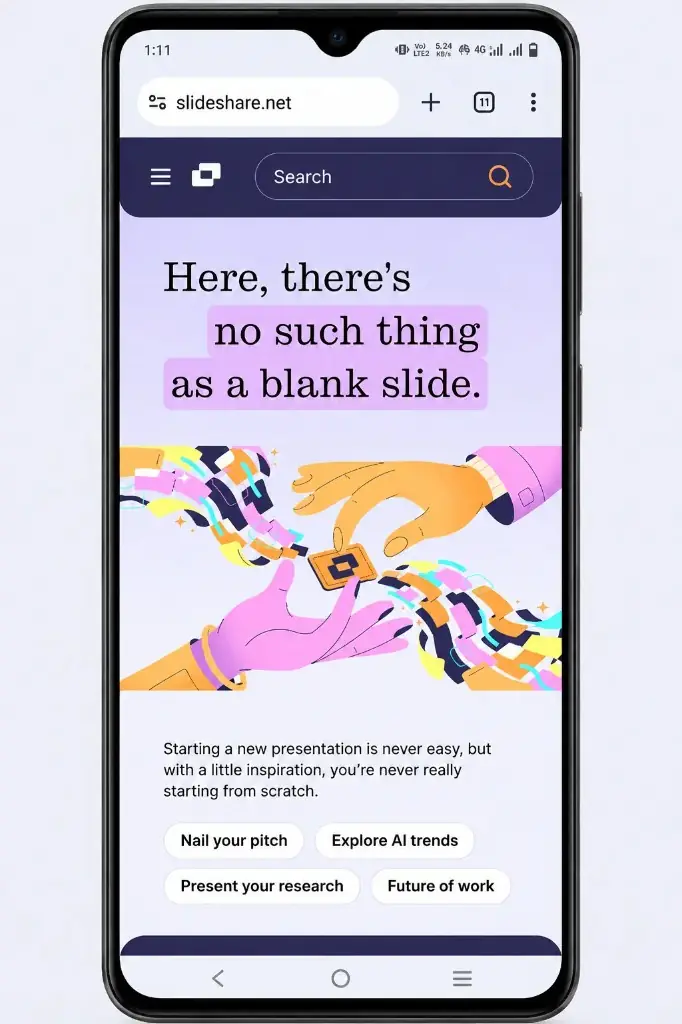
- Open the SlideShare app or visit slideshare.net on your phone or tablet.
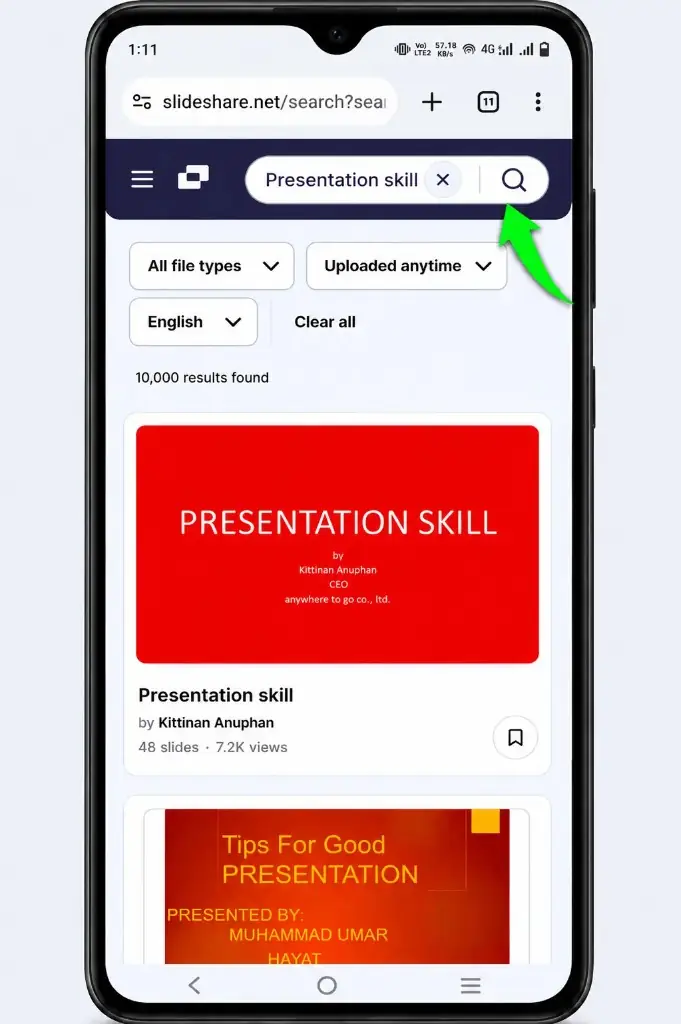
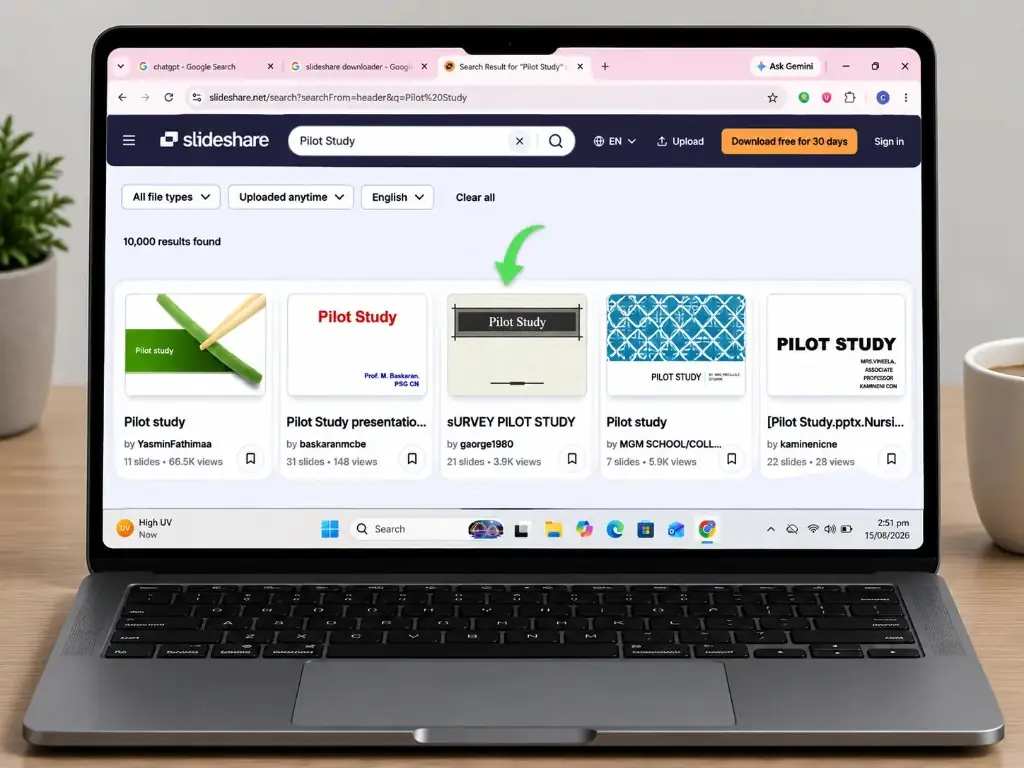
- Search for the presentation you want to save and open it.
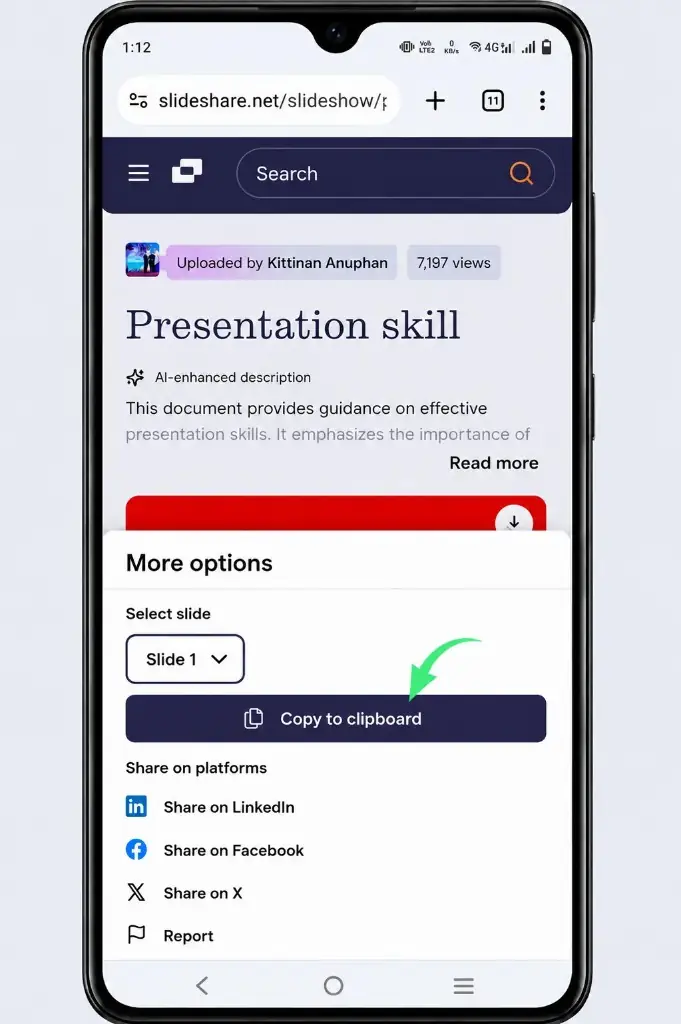
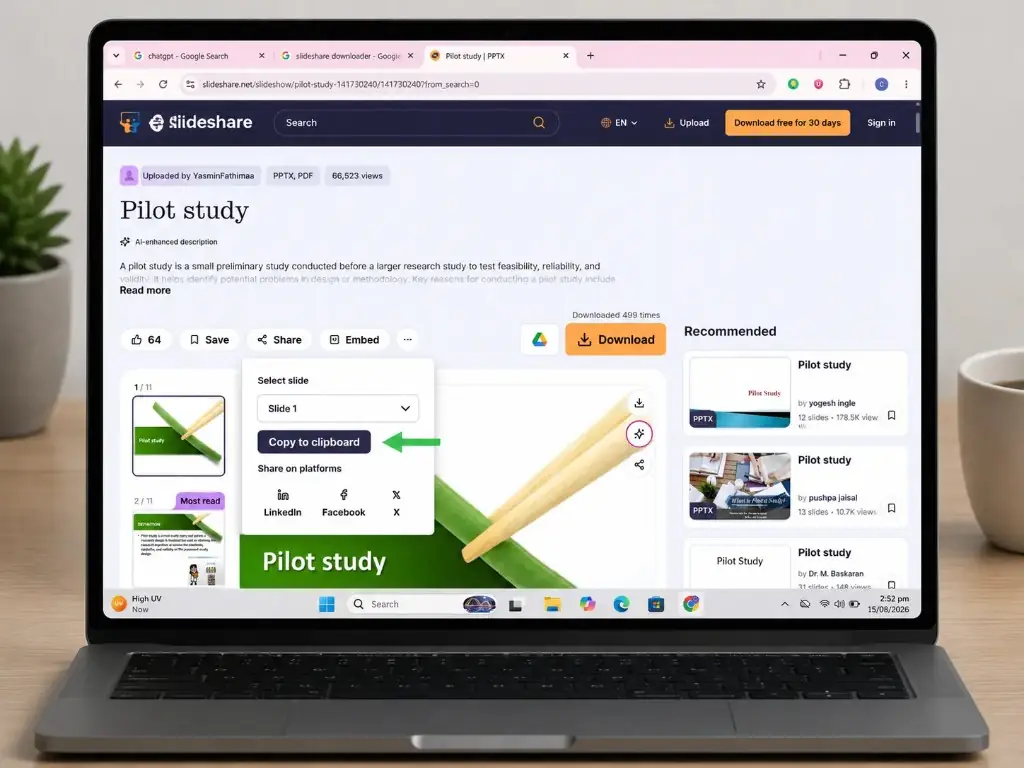
- Tap Share and copy the presentation link to your clipboard.
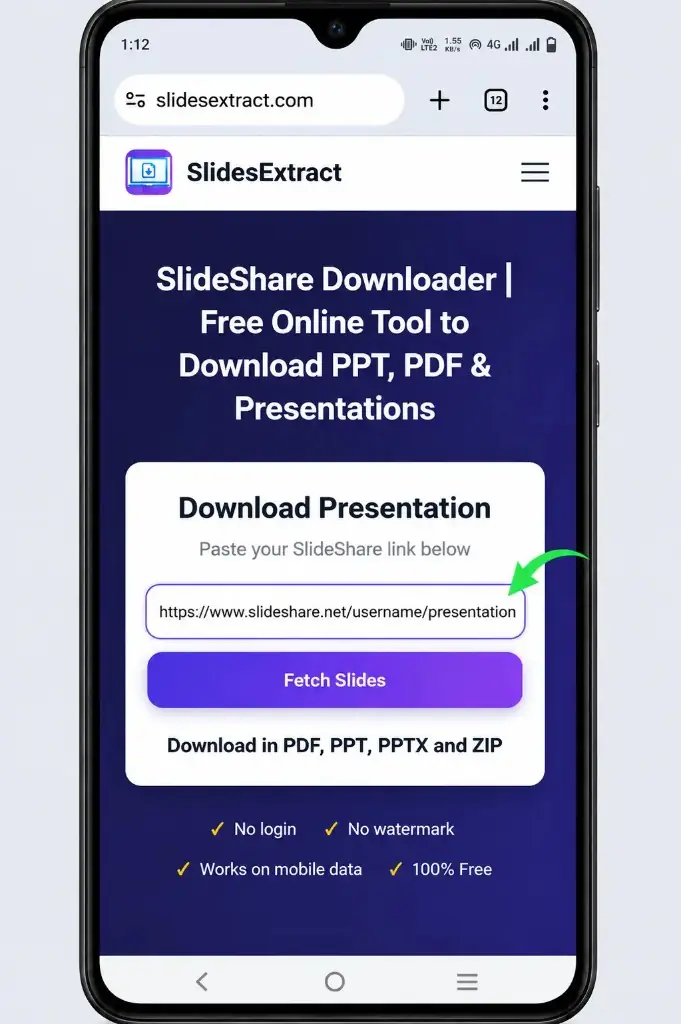
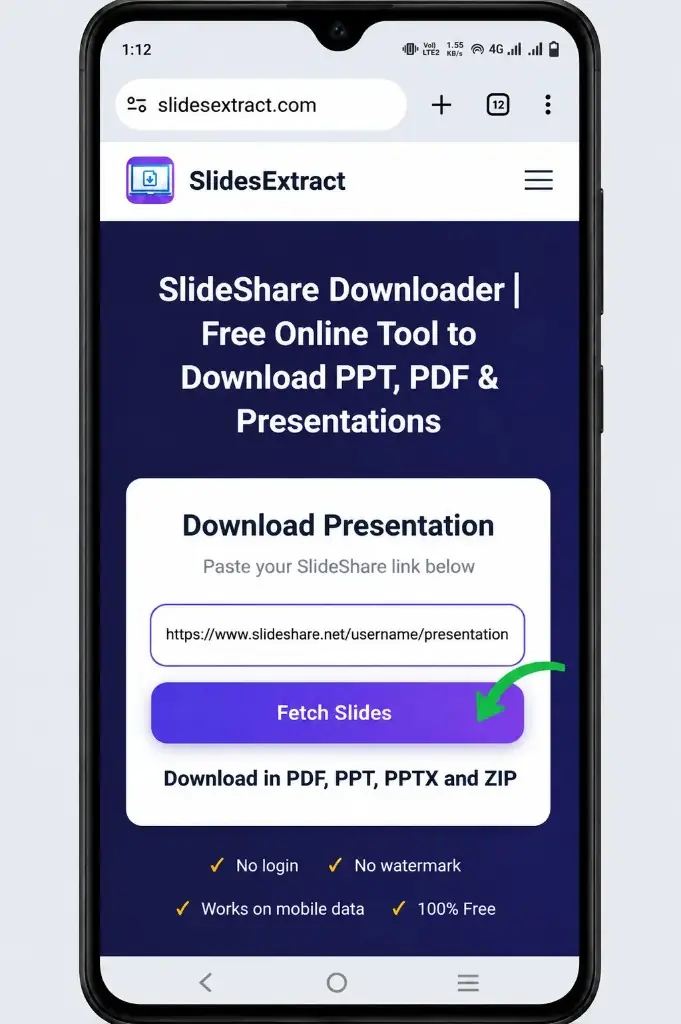
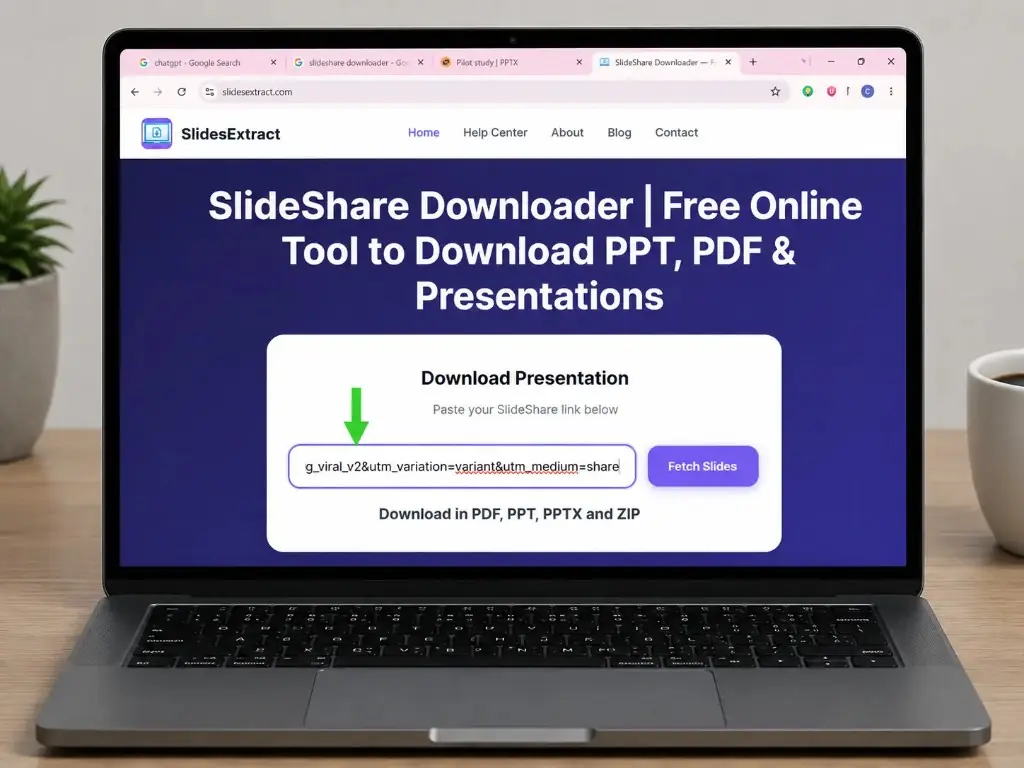
- Paste the link into the downloader at the top of this page.
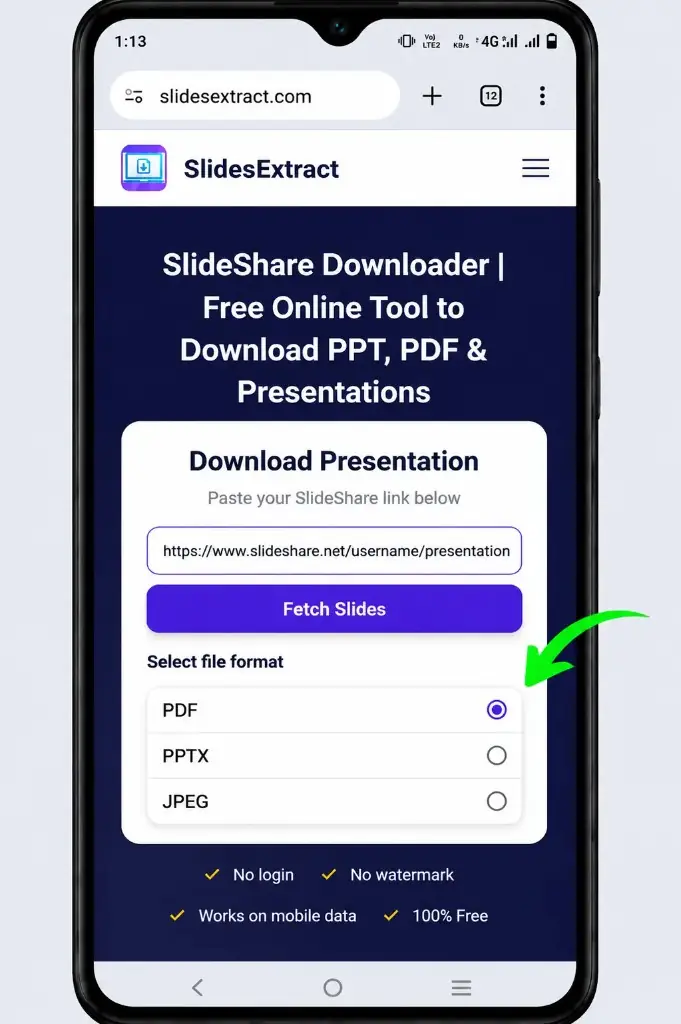
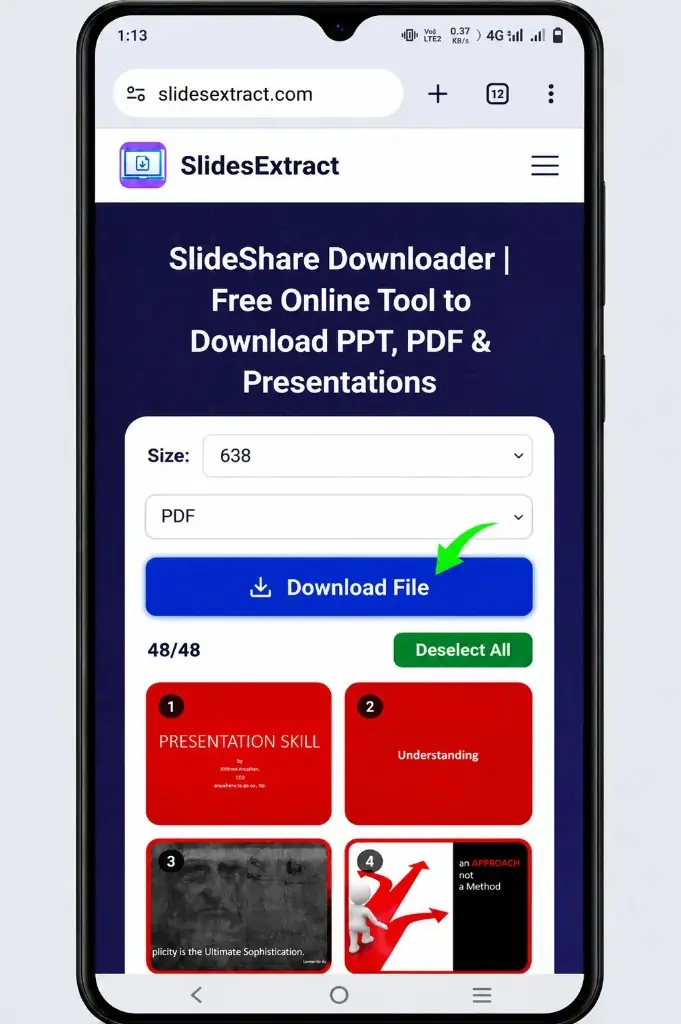
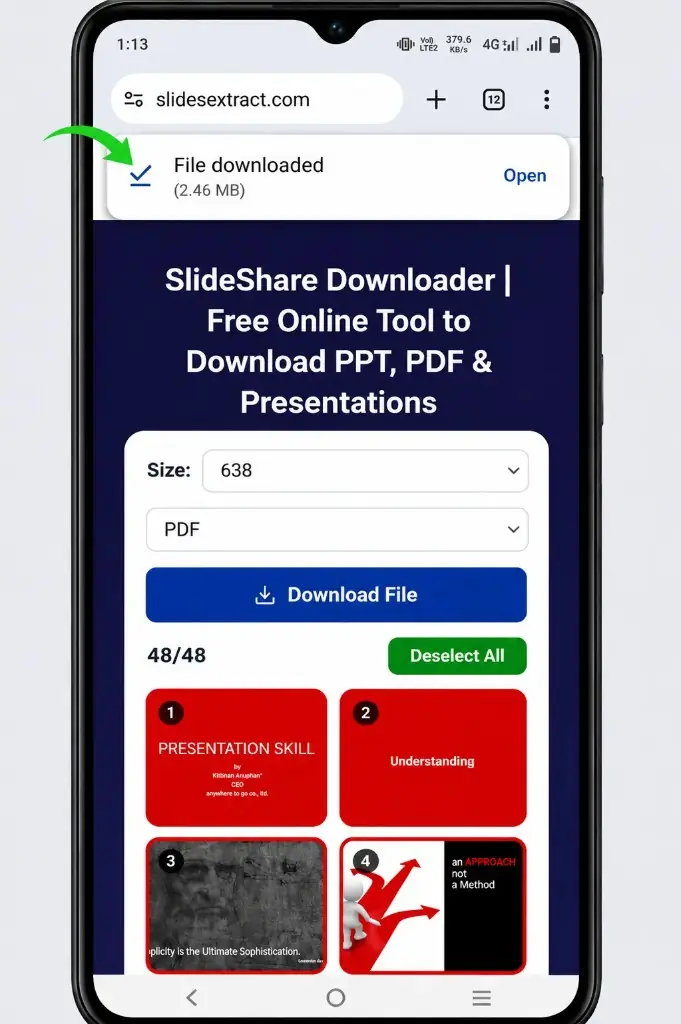
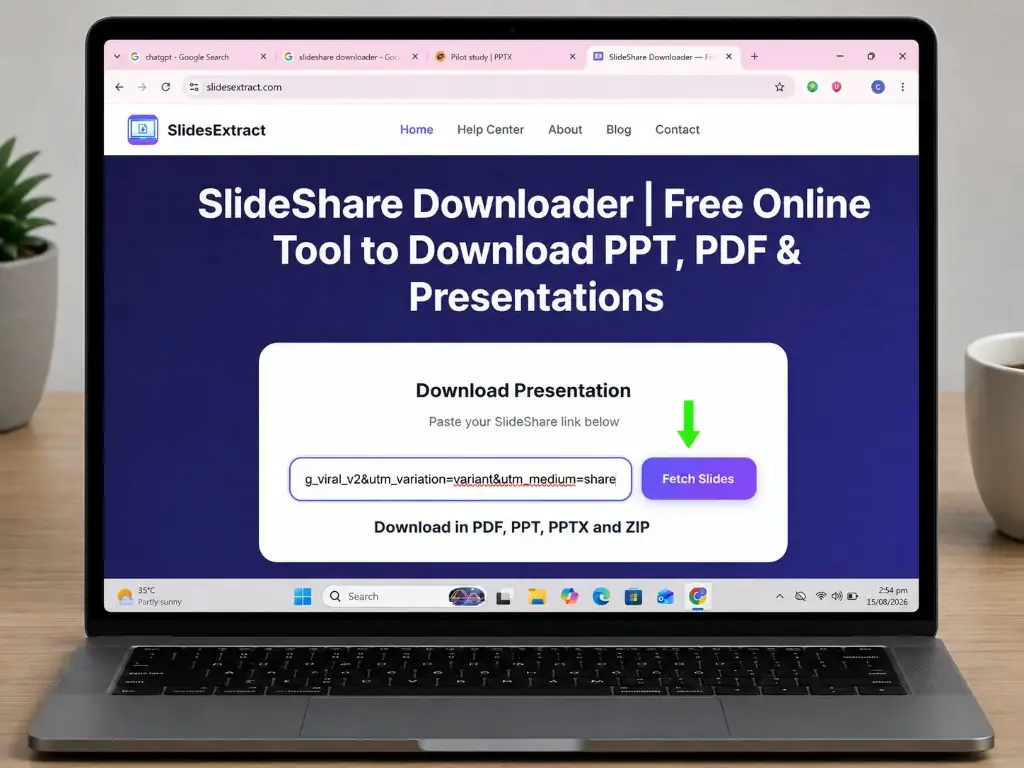
- Tap Fetch Slides, choose PDF or PPT format, then tap Download File.
- Open the saved file from your device downloads folder.
How to Download From SlideShare Downloader on Windows PC / Laptop / Mac
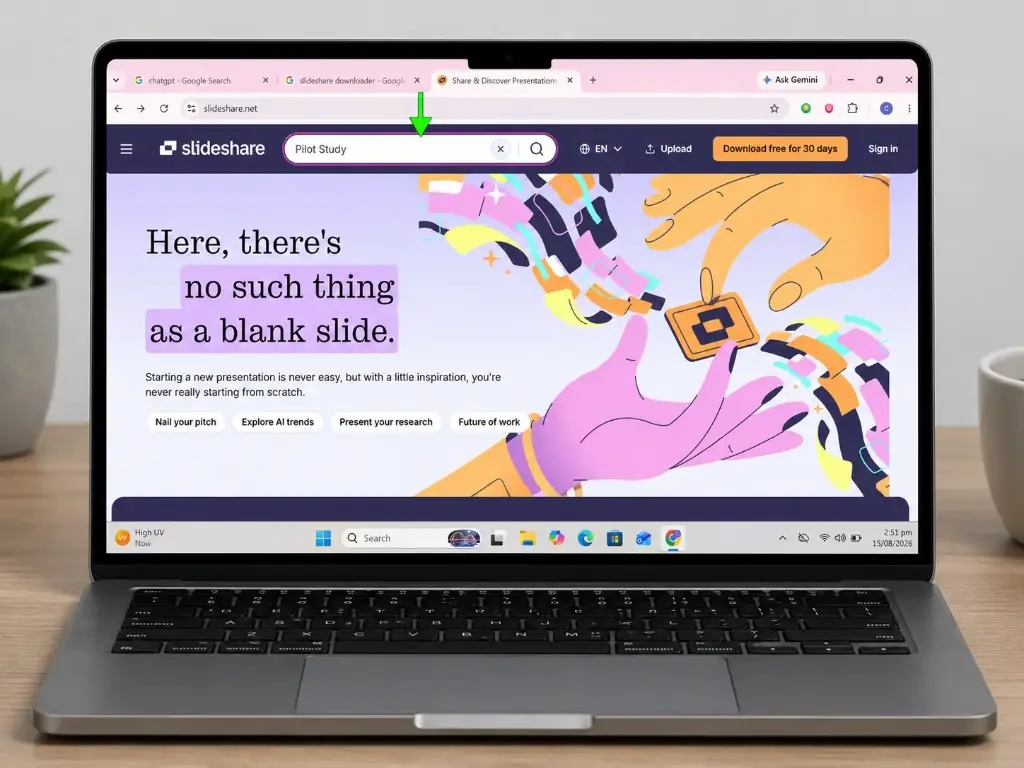
- Open www.slideshare.net in your browser and search for the presentation.
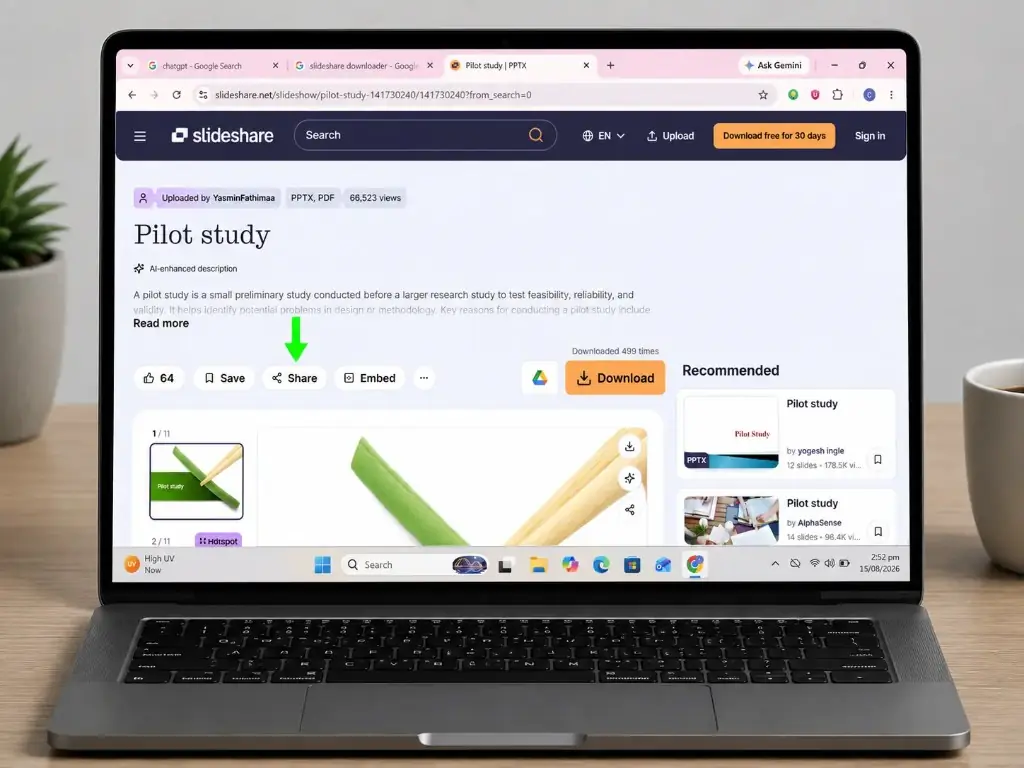
- Click the deck you want, then click the Share button.
- Select Copy to clipboard to copy the presentation URL.
- Paste the URL into the downloader at the top of this page.
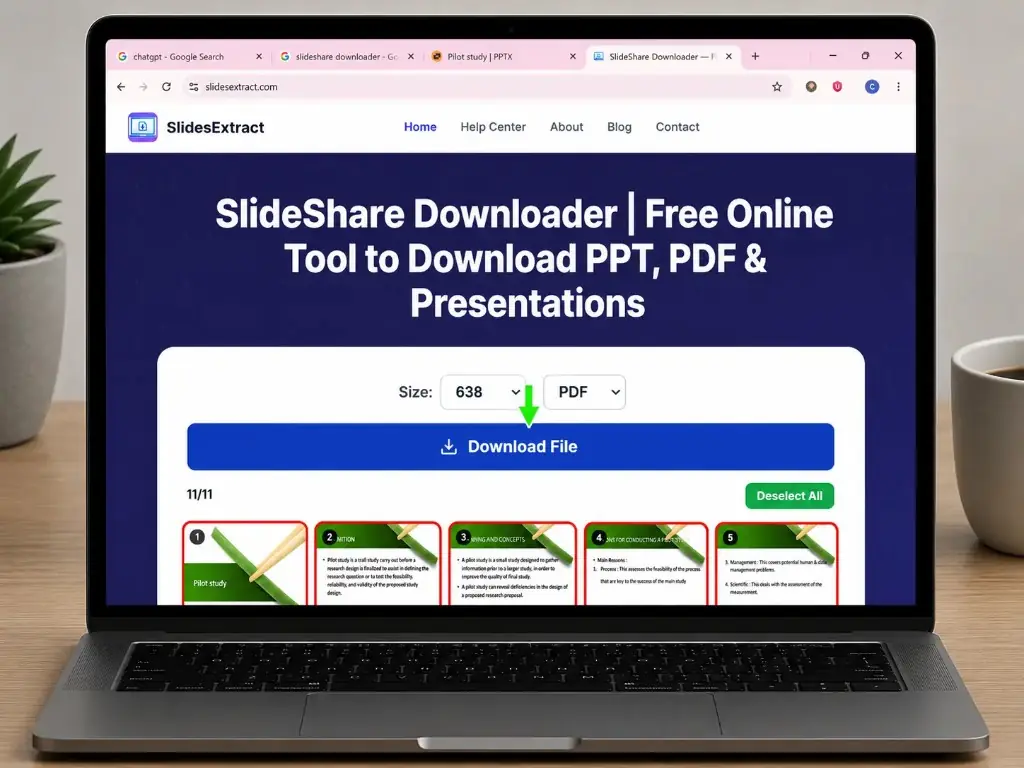
- Click Fetch Slides, then choose your preferred size and format (PDF, PPT, or ZIP).
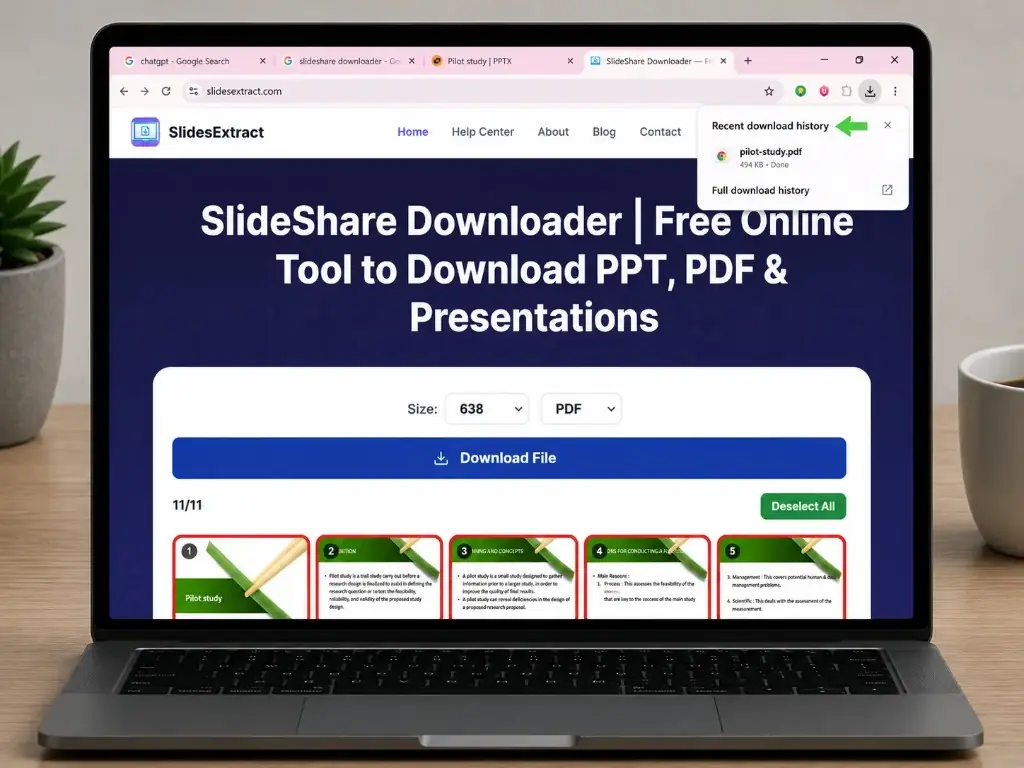
- Click Download File and save the presentation to your computer.
Output Quality and Conversion Limitations
- Source resolution — converters cannot recreate missing detail.
- Slide dimensions — widescreen vs older ratios may differ.
- Fonts — image-based text preserves appearance, not editability.
- Animations — static output shows appearance, not motion.
- Video & audio — embedded media may not transfer.
Always verify important files before printing, teaching, or professional use.
Public vs Private SlideShare Content
This tool is for publicly accessible presentations only. Do not use it for private, password-protected, or authentication-restricted content. Deleted presentations cannot be recovered — contact the author for an authorized copy.
Copyright and Ethical Use
Downloading ≠ owning content. Public decks may still be copyrighted. Before reuse, consider licenses, attribution, modification rights, and commercial permissions. Give credit when required, don't remove ownership notices, and ask the author when unsure.
✅ Pros
- Simple URL-based workflow
- Offline reference copies
- PDF & PPT options
- Browser-based — no install
- 100% free
- Transparent limitations
❌ Cons
- Not every deck converts
- PPT may not be fully editable
- Dynamic content may be lost
- Source quality limits output
- Copyright still applies
About This Tool
This SlideShare Downloader helps you save public slideshare presentation content as PDF or PPT while being clear about limits. Whether you searched downloadslide, slides share com, or slideplayer ppt download, this browser-based tool focuses on official SlideShare links — no install, no slideshare net login, and no bypassing private decks.
Troubleshooting
- URL not working
- Copy the full URL from slideshare.net or www.slideshare.net — not a search snippet.
- Presentation is private
- Request access from the author; private decks cannot be retrieved.
- Presentation deleted
- Contact the author for an authorized copy.
- Download fails
- Check URL, public access, page loads normally, and format is offered.
- PPT text not editable
- Slides are likely image-based inside the PPT file.
- Blurry slides
- Source resolution is low — conversion cannot restore missing detail.
- Videos missing
- Static conversion may omit embedded media.
- Slow processing
- Large decks take longer; avoid resubmitting while processing.
Frequently Asked Questions
Start Downloading a Public SlideShare Presentation
Copy a complete public URL, paste it into the downloader above, choose your format, and download — free, no login required.
↑ Back to Downloader